ClrRect function
Sets the values of the specified rectangle to zero
Description
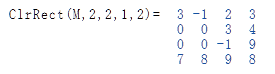
The ClrRect function returns the copy of a table in which the values of the specified rectangle are set to zero.
Syntax
ClrRect (table, ri, rn, ci, cn)
ClrRect (table, ri, rn, ci, cn)
- table - The table to be edited
- ri - Index to the first line to be deleted
- rn - Number of lines to be deleted
- ci - Index to the first column to be deleted
- cn - Number of columns to be deleted
Examples
Data field based functions
| ClrRect | Deletes a rectangular area |
| Clip | Limits values of a data field |
| Count | Returns number of elements |
| Diff | Difference values of elements |
| Dim | Number of dimensions of tables |
| Flat | Joins rows of a table |
| GetAt | Value of a specified position |
| GetRect | Returns the specified area |
| Insert | Inserts new elements |
| Join | Join fields together |
| New | Generates a new list |
| Pick | Get selected items from a list |
| Remove | Removes items from a list |
| Reverse | Inverts the order in a list |
| Scale | Converts values to a new scale |
| SetAt | Sets a value at a position |
| Split | Splits a list into sublists |
| Sum | Returns the sum of all elements |
| Text | Generates a text list |
| Trim | Removes invalid values |
|
|