Insert function
Insert new elements into a data field
Description
The Insert function inserts new elements at the specified index into a list or table.
Lists
A single value or a list can be inserted into a one-dimensional list.
Tables
In a two-dimensional field (table) a list or a table can be inserted.
- A list is inserted into the table as a new line at the specified position
- The length of the list is adjusted, if necessary, to the number of columns in the table
- For adjustment either elements with the value zero are added or elements are cut off
A table can only be inserted into a table if the number of columns is identical.
Syntax
Insert (field, index, element)
Examples
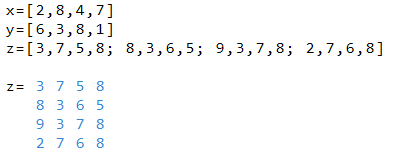
Insert the number 42 at the 3rd position in x

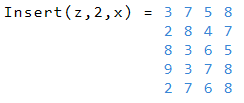
The list y is inserted at 2nd position in x

Insert line x in 2nd position in z
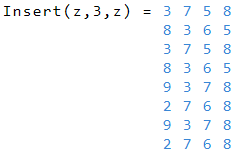
Insert table z at the 3rd position in z
Data field based functions
| ClrRect | Deletes a rectangular area |
| Clip | Limits values of a data field |
| Count | Returns number of elements |
| Diff | Difference values of elements |
| Dim | Number of dimensions of tables |
| Flat | Joins rows of a table |
| GetAt | Value of a specified position |
| GetRect | Returns the specified area |
| Insert | Inserts new elements |
| Join | Join fields together |
| New | Generates a new list |
| Pick | Get selected items from a list |
| Remove | Removes items from a list |
| Reverse | Inverts the order in a list |
| Scale | Converts values to a new scale |
| SetAt | Sets a value at a position |
| Split | Splits a list into sublists |
| Sum | Returns the sum of all elements |
| Text | Generates a text list |
| Trim | Removes invalid values |
|
|